Skip to content

SteadyDevs Upkeep Check · free WordPress plugin

Know which plugins have gone quiet.

A plugin that stops getting updates stops getting security fixes, and WordPress won't warn you. Upkeep Check finds the plugins that were closed, abandoned or left behind, and tells you in plain words what to do about each one.

Version 1.1.0 · GPL, free forever · WordPress 6.0+ · PHP 7.4+ · no account, no sign-up · listed on WordPress.org

Tools → Upkeep Check
ACT NOWSITE HEALTH

1 plugin is closed or looks abandoned

Widget Logic was closed on WordPress.org on 14 April 2026. Replace it.

Built for Site ownersAgencies with client sitesSecurity reviewsSite handoversHosting audits

How it works

One button, one report, no guesswork

These are real screenshots, from a check on a demo site against the live WordPress.org directory.

The report

Every plugin, worst first, with what to do

Go to Tools → Upkeep Check and press Check my plugins. Each plugin gets a verdict you can act on, next to the facts behind it: when it was last updated, the WordPress version it was tested with and how many sites use it.
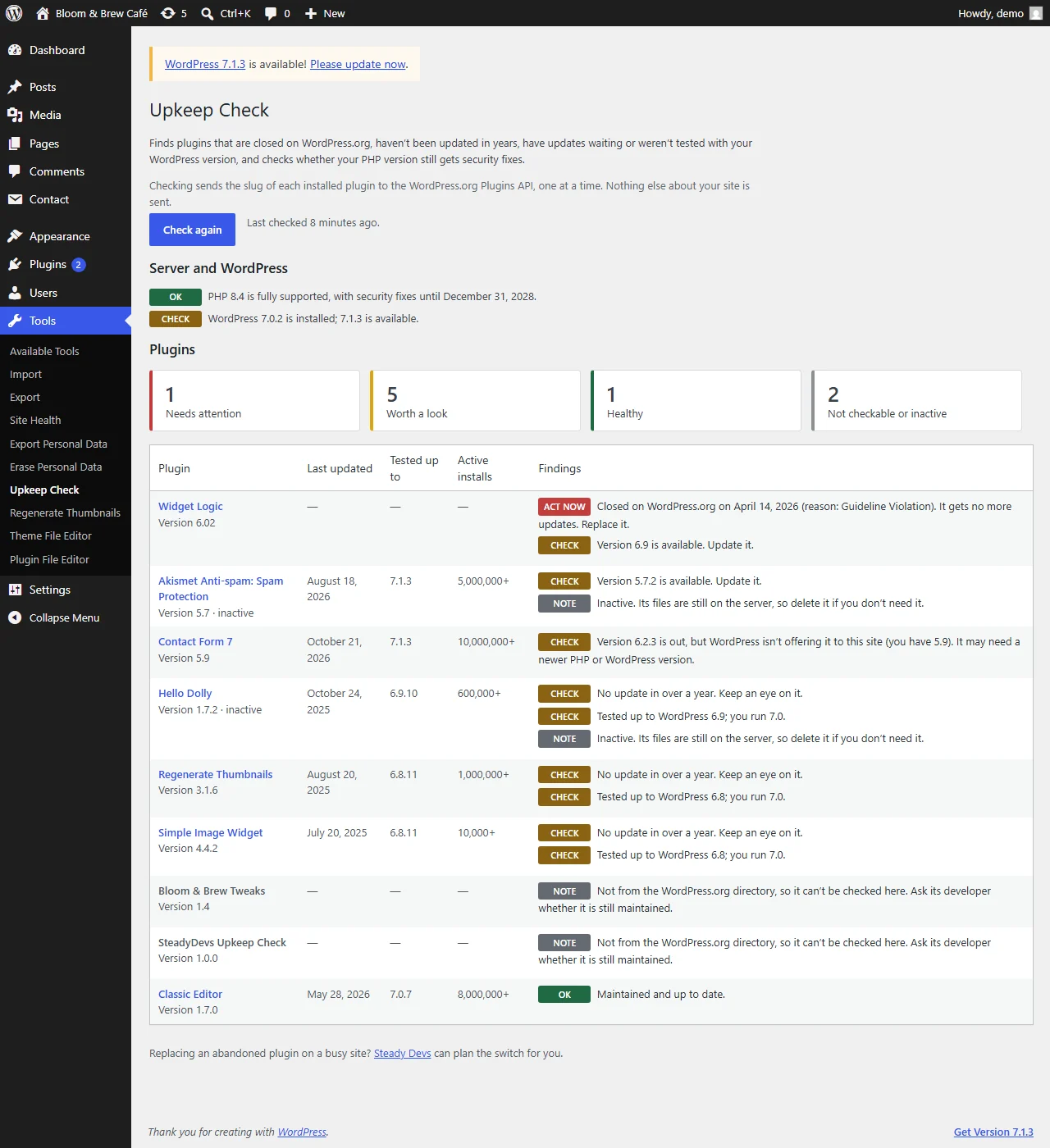
  • Closed plugins show the date and the reason WordPress.org gives
  • Your PHP and WordPress versions are checked on the same page
  • Custom and premium plugins are marked as not checkable, never mistaken for a directory plugin with the same folder name
Upkeep Check report: PHP and WordPress status, summary counts, and a table of plugins with findings such as closed on WordPress.org, update available and no update in over a year.

Site Health

The result stays where you already look

After a check, Tools → Site Health shows a critical issue when a plugin is closed or abandoned, and a recommendation when updates are waiting. It reads the saved report, so opening Site Health stays as fast as before.
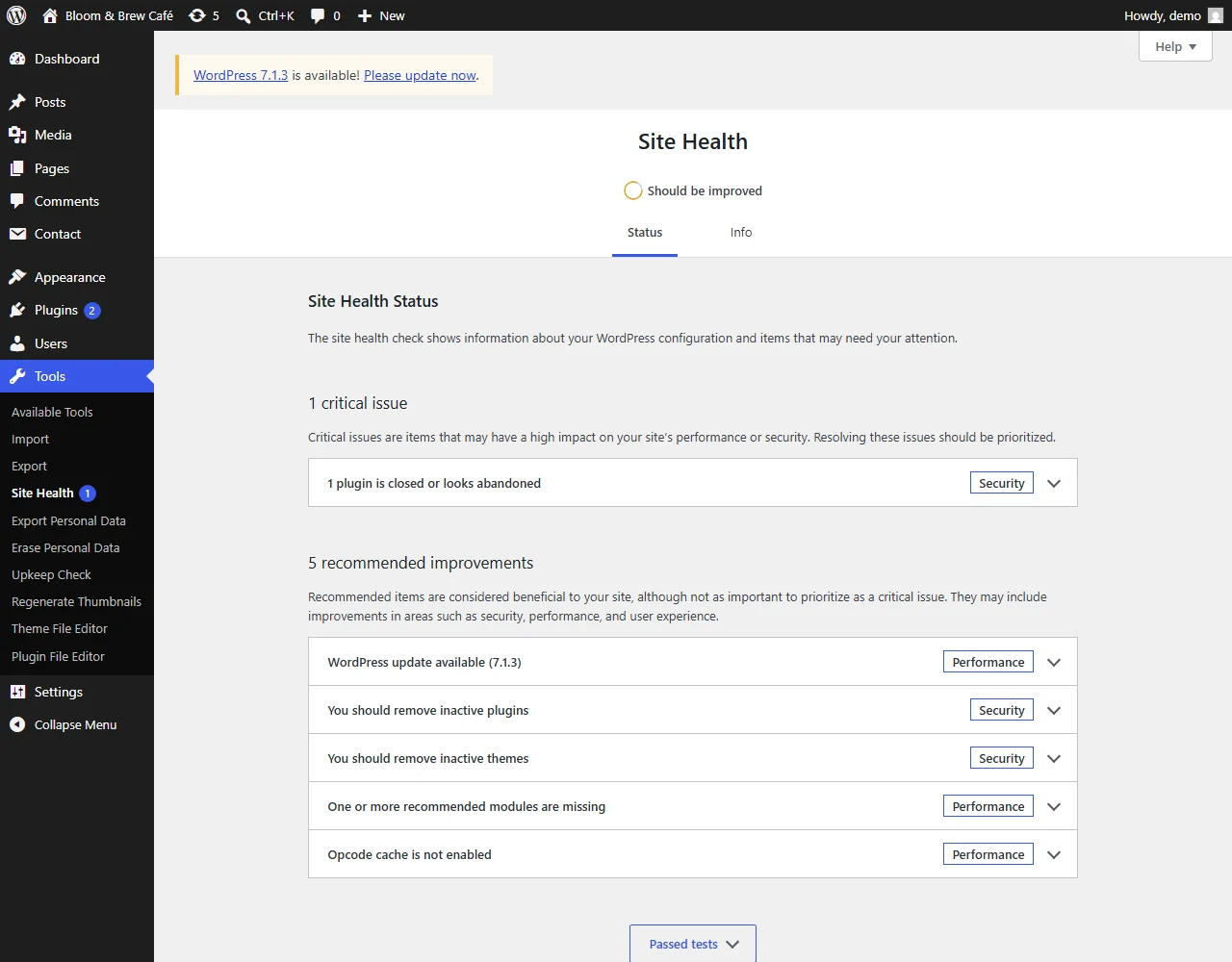
  • Names the plugins to replace
  • Links straight back to the full report
  • No nagging before you've run a first check
WordPress Site Health showing the critical issue: 1 plugin is closed or looks abandoned.

What it checks

The things WordPress doesn't tell you

The Plugins screen shows updates. It doesn't show which plugins will never get another one.

Closed on WordPress.org

Plugins removed from the directory, often for a security issue, keep running on your site with no warning. Upkeep Check shows when and why they were closed.

Abandoned

No update in over two years is flagged to act on. No update in over a year is flagged to keep an eye on.

Untested

Plugins whose authors haven't tested them with the version of WordPress you run.

Updates held back

When the directory has a newer version than WordPress offers your site, usually because it needs a newer PHP or WordPress, you're told why the update isn't showing.

Inactive plugins

Switched off but still on the server. Delete the ones you don't need.

PHP support dates

Whether your PHP version still gets security fixes, and the date it stops, from php.net's own schedule.

Light by design

Nothing runs until you press the button

No background scans, nothing on the front end of your site, and no account. One option holds the last report, and deleting the plugin removes it.

Get started

Free. Every check. No catch.

Your first report in two minutes

  1. 01
    Install
    Plugins → Add New Plugin, search for "SteadyDevs Upkeep Check", install and activate.
  2. 02
    Check
    Tools → Upkeep Check → Check my plugins.
  3. 03
    Act on the top rows
    Replace what's closed or abandoned, update what's waiting, delete what's inactive.

Found something you can't just switch off?

Replacing a plugin your site depends on?

An abandoned plugin that runs your forms, bookings or checkout can't simply be deleted. Our engineers can find a maintained replacement, move your data across and switch over without downtime.

FAQ

Common questions

Is Upkeep Check really free?
Yes. Every check is in the free plugin, with no limits, and it's open source under the GPL. There is no paid version. If you'd like help replacing what it finds, that's a separate engineering service.
Does it slow my site down?
No. It does nothing on the front end, and nothing in the admin until you press the button. Site Health only reads the last saved report.
What does "closed" mean?
WordPress.org removed the plugin from its directory, for example for a security issue or a guideline violation, or because the author asked. A closed plugin gets no more updates through WordPress, even if it is still installed on thousands of sites.
Why is one of my plugins "not checkable"?
It doesn't come from the WordPress.org directory: it's a premium plugin, a custom one, or it updates from somewhere else. Upkeep Check won't guess about it. Ask its developer whether it is still maintained.
Is an old plugin always a problem?
Not always. Some small plugins are finished and still work. That's why one to two years without an update is marked "keep an eye on it", and only over two years, or a closure, is marked to act on.
Where do the PHP dates come from?
From php.net's supported versions page. They're built into the plugin, so checking PHP sends nothing anywhere.
What are the requirements?
WordPress 6.0 or newer and PHP 7.4 or newer.
Is it on WordPress.org?
Yes, it's listed at wordpress.org/plugins/steadydevs-upkeep-check. Install it from Plugins → Add New Plugin in your dashboard, and updates arrive there automatically.

Find out what's quietly out of date.

Download Upkeep Check, press one button, and see which plugins need you.

Question, bug or feature request?

Tell us what you found or what you'd like it to check. We usually reply within one business day.